
Minecraftstuff.net is still under active development. Please report any bugs, ideas or suggestions using the contact form.
Wow guys.. I love all of you. If you have ideas, you can spam me at loulouconankira[at]gmail[dot]com. I'll read all off them.
Oh, and sorry for the lack of update, i'm not really into Minecraft these days.
My second texture pack.
After Douxcraft, I was looking for something more... themed.
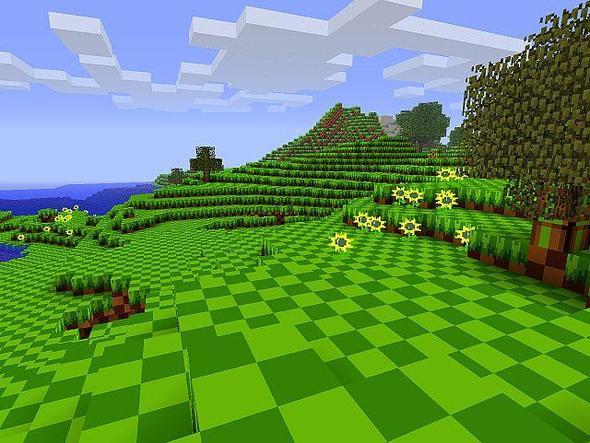
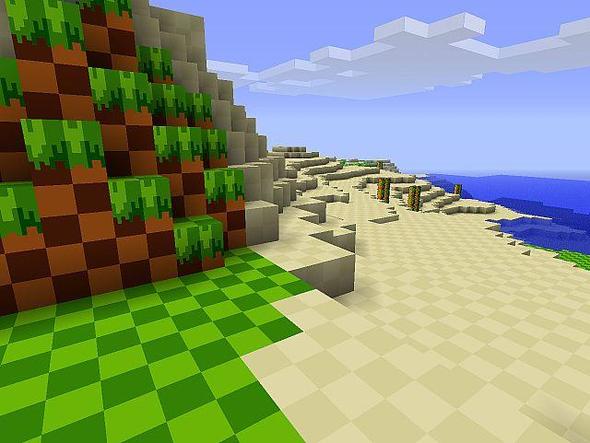
So, here's GreenMine! The maybe-not first texture pack based on Sonic!
Hey, look at those grass and dirt! Doesn't that reminds you when you were 10, playing Sonic on your Genesis/Megadrive?
This is an early test version. Enjoy!
To install a texture pack, the file must first be obtained in a ZIP format. Without decompressing the file, place the ZIP file in:
This path can be opened by using the Open Texture Pack Folder button from the game client. Once a texture pack is installed, it can be selected in the Mods and Texture Packs screen accessible from the main menu, but not while a world is currently open.