
Minecraftstuff.net is still under active development. Please report any bugs, ideas or suggestions using the contact form.
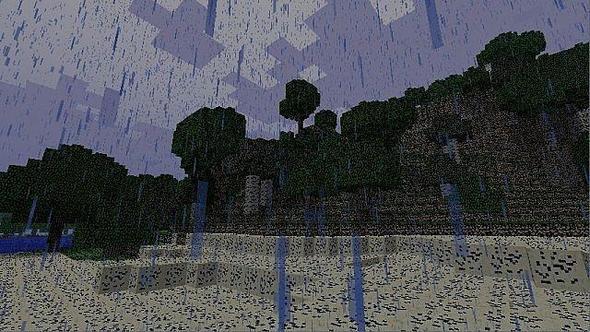
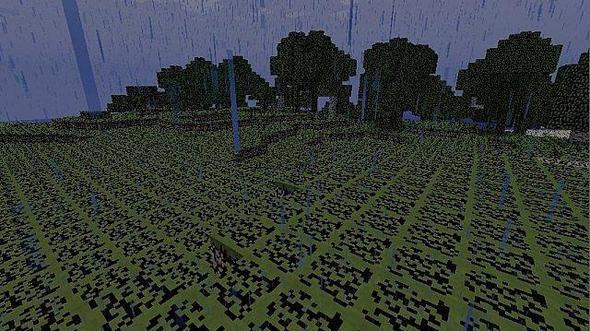
Welcome to SketchCraft!
Welcome! This is my third texture pack, hopefully you'll enjoy it! SketchCraft is just as the name says, a sketch version of Minecraft! Currently, only the terrain has been changed, but I'm working on converting the rest into sketch-form. It's actually a very simple texture pack, but hopefully it brings something new to your minecraft.
How to install: Download the file from Mediafire. Then, open up your minecraft and login. Once on mainscreen, go to texturepacks. On the bottom left, there is button to open up the folder where you place them. Place the zip file directly into it. DO NOT EXTRACT! You can place multiple texture packs that can easily be switched beetween. Thanks. Currently, this texture pack is still in beta, for I am not finished with the rest of the files. The remaining files that haven't been sketched are the default textures.
How to install: Please Leave Feedback! Tell me what you like, what you don't! Future Plans:
Progression: 40% (Next release after 50%)SketchCraft Credit: MidniteBeast 100% (Me)
Progression: 40% (Next release after 50%)
To install a texture pack, the file must first be obtained in a ZIP format. Without decompressing the file, place the ZIP file in:
This path can be opened by using the Open Texture Pack Folder button from the game client. Once a texture pack is installed, it can be selected in the Mods and Texture Packs screen accessible from the main menu, but not while a world is currently open.